

Delivery optimization configuration
Starting with Windows 10, Microsoft introduced Delivery Optimization (DO) as a built-in Windows component used to download content from Microsoft services, peers on the local network, or caching servers. Delivery Optimization is commonly used for distributing Windows Updates, Microsoft Store content, and other cloud-delivered packages.
Microsoft provides administrators with several methods to manage Delivery Optimization configuration on client devices, including:
Group Policy (via Active Directory)
Microsoft Intune policies
Client Settings in Configuration Manager
When StifleR is used to manage content downloads, it is important to ensure that existing Delivery Optimization configuration settings do not conflict with the configuration applied by StifleR.
How StifleR Manages Delivery Optimization
StifleR manages Delivery Optimization settings through the use of Templates.
Templates are applied to Network Groups, and each Network Group can contain one or more subnets. These Network Groups effectively function as peering boundaries, allowing StifleR to control how clients share content within a defined network scope.
Delivery Optimization itself uses a similar concept called DO Groups, which define the scope of peer-to-peer sharing between devices. StifleR templates can automatically configure DO Groups based on the defined Network Groups, ensuring that clients only peer with other devices within the same logical network.
Through Templates, StifleR can centrally define Delivery Optimization settings and enforce consistent configuration across clients in the same Network Group.
For detailed information about which Delivery Optimization settings can be managed by StifleR, refer to the corresponding configuration reference table.
Group Policy considerations
Microsoft allows Delivery Optimization settings to be configured using Group Policy through Active Directory or device configuration policies in Intune.
If Delivery Optimization settings are already managed through Group Policy or Intune, they may override or conflict with the settings applied by the StifleR client. This can prevent StifleR from properly managing Delivery Optimization behavior.
For this reason, it is recommended to review existing Delivery Optimization policies and remove or disable any settings that may conflict with StifleR’s configuration.
Refer to the Delivery Optimization configuration reference table to identify which settings are controlled by StifleR.
Configuration Manager considerations
In Configuration Manager environments, Delivery Optimization can also be influenced by Configuration Manager client settings.
StifleR manages Delivery Optimization peering groups based on how Network Groups are defined within StifleR. To avoid conflicts, Configuration Manager should not automatically assign Delivery Optimization group identifiers.
When implementing StifleR in a Configuration Manager environment, ensure the following client setting is disabled:
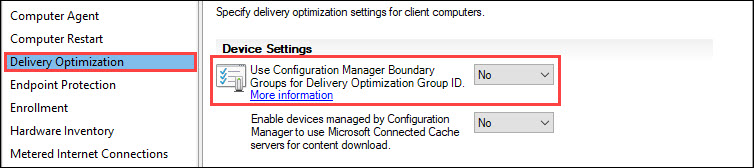
Disabling this setting allows StifleR to fully control the Delivery Optimization group configuration based on its Network Group structure.
Last updated