> For the complete documentation index, see [llms.txt](https://documentation.2pintsoftware.com/llms.txt). Markdown versions of documentation pages are available by appending `.md` to page URLs; this page is available as [Markdown](https://documentation.2pintsoftware.com/stifler/operations-and-features/overview-and-navigation/devices/stifler-server/templates-detail.md).
# Templates detail
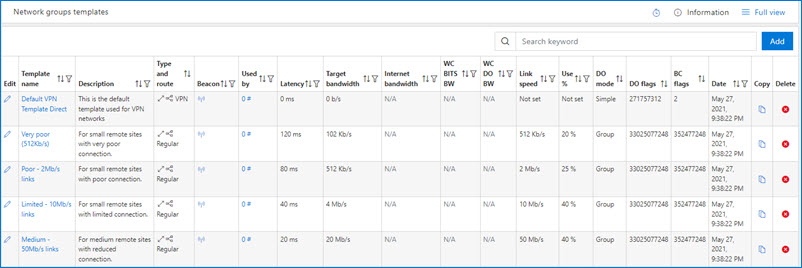
A Template is a way to control all settings for a Network Group. Basically a linked Network Group will inherit all values from a template.
A Template offers the following:
* Controls initial settings at network creation
* Best template is matched using the Beacons and the right template is selected as follows:
* Fastest Beacon, so any Template that matches the Beacon ID.
* We then match the best list of Templates using latency and bandwidth.
2Pint Software provides many out-of-the-box templates which represent settings for various scenarios. At the "Templates" page, select the edit button next to any template to view and adjust settings.
The table below lists all of the settings available within a template. The setting defaults will differ between templates depending on their purpose. Please review the information on the [Bandwidth management and allocation](/stifler/operations-and-features/bandwidth-management.md) page which explains how different settings applies to different scenarios.
### Network Group Template
Setting
Description / Options
Id
The GUID which is assigned to the template.
Description
A description of the template.
Date Added
The date and time in which the template was created.
Networks on this group are directly routed
Options:
Direct route
Not directly routed (via NAT)
### Bandwidth and throttling settings
| Setting | Description / Options |
| ---------------------------------------------- | ------------------------------------------------------------------------------------------------------------------------------------------ |
| Type of network |
Options:
Regular network (default)
Well connected
VPN
DataCenter
BuildDepot
|
| Internet breakout |
Options:
No separate throttling for Internet traffic (default)
No separate throttling for Internet traffic
|
| Throttling of bandwidth | Mb/s (Mbps) |
| Max bandwidth (downstream) | b/s (Not set) |
| Target bandwidth by % | 0-100% |
| Separate throttling of internet bandwidth | b/s |
| Well connected DO bandwidth | b/s |
| Well connected BITS bandwidth | b/s |
| Non-leader DO bandwidth for regular networks | Kb/s |
| Non-leader BITS bandwidth for regular networks | Kb/s |
### Automatic throttling and LEDBAT++ settings
| Setting | Description / Options |
| -------------------------- | -------------------------------------------------------------------------------------------------------------------------------------------------------------------------------------------------------------------------------------------------------------------------------------------------------- |
| Beacon | FQDN of Beacon server |
| Measure vs template values |
Options:
Beacon measure wins (default)
Template wins
|
| Automatic bandwidth tuning |
Options:
0 - Disabled
1 - Latency
8 - LEDBAT
16 - Estimate Max Bandwidth
See this page for more information about bandwidth tuning.
|
| Server Secret | \ |
| Set LEDBAT++ on BITS Uploads |
Options:
Do set BITS uploads to use LEDBAT++
Use LEDBAT++ for uploads
|
| Set BranchCache to local mode on Wifi |
Options:
Disabled (default)
Enabled
|
| Force distributed mode |
Options:
Disabled (default)
Enabled
|
| Force Hosted Cache Mode |
Options:
Disabled (default)
Enabled
|
| Set BranchCache to use port 1337, 1338, 1339 |
Options:
Yes, manage the ports (default)
Manually manage ports
|
| Manage cache sizes |
Options:
Enabled (default)
Managed manually
|
| Cache options set (change via WMI) | 10 GB for disks 128 GB and less, 10% for 250-500 and 50 GB for 480+ |
| Disable GreenLeader for clients on wired networks |
Options:
Wired clients can use Green Leaders (default)
Wired clients use distributed mode
|
| Always use Green Leader(s) for clients on Wi-Fi |
Options:
Wi-Fi clients may use Green Leaders (default)
Wi-Fi clients always use Green Leaders
|
| Automatically select Blue Leader(s) if needed |
|
| Automatically set group ID (using Network Group ID) |
Options:
Enabled (default)
Managed manually
|
| Disable P2P on Wi-Fi networks |
Options:
Managed manually (default)
Enabled
|
| Enable DNS-SD for peer discovery |
Options:
Disabled (default)
Enabled
|
| Disable Teredo responses to multicast |
Options:
Disabled (default)
Enabled
|
| Randomize fallback times to randomize start times |
Options:
Enabled (default)
Managed manually
|
| Force low RAM machines to use P2P |
Options:
Enabled (default)
Managed manually
|
| Manage cache size |
Options:
Enabled (default)
Managed manually
|
| Cache options set (change via WMI) | 10 GB for disks 128 GB and less, 10% for 250-500 and 50 GB for 480+ |
| Allow small files to peer |
Options:
Enabled (default)
Not set
|
| Configure maximum cache age |
Options:
Enabled (default)
Not set
|
| Configure minimum background QoS for more P2P |
Options:
Enabled (default)
Not set
|
| Delay foreground download from http for more P2P |
Options:
Enabled (default)
Not set
|
| Delay background download from http for more P2P |
Options:
Enabled (default)
Not set
|
| Delay Cache Server fallback foreground for more P2P |
Options:
Enabled (default)
Not set
|
| Delay Cache Server fallback Background for more P2P |
Options:
Enabled (default)
Not set
|
---
# Agent Instructions
This documentation is published with GitBook. GitBook is the documentation platform designed so that both humans and AI agents can read, navigate, and reason over technical content effectively. Learn more at gitbook.com.
## Querying This Documentation
If you need additional information that is not directly available in this page, you can query the documentation by asking a question.
Perform an HTTP GET request on the following URL with the `ask` and `goal` query parameters:
```
GET https://documentation.2pintsoftware.com/stifler/operations-and-features/overview-and-navigation/devices/stifler-server/templates-detail.md?ask=&goal=
```
`ask` is the immediate question: it should be specific, self-contained, and written in natural language.
`goal` is what the user is ultimately trying to achieve, the reason they need the answer. Sharing it helps GitBook give you a better, more relevant answer. A goal is most helpful when it describes the outcome the user wants rather than restating the question. For example, with `ask=how do I create an API token`, a goal like `automate deployments from our CI pipeline` lets GitBook tailor the answer to that use case.
The response will contain a direct answer to the question and relevant excerpts and sources from the documentation.
Use this mechanism when the answer is not explicitly present in the current page, you need clarification or additional context, or you want to retrieve related documentation sections.