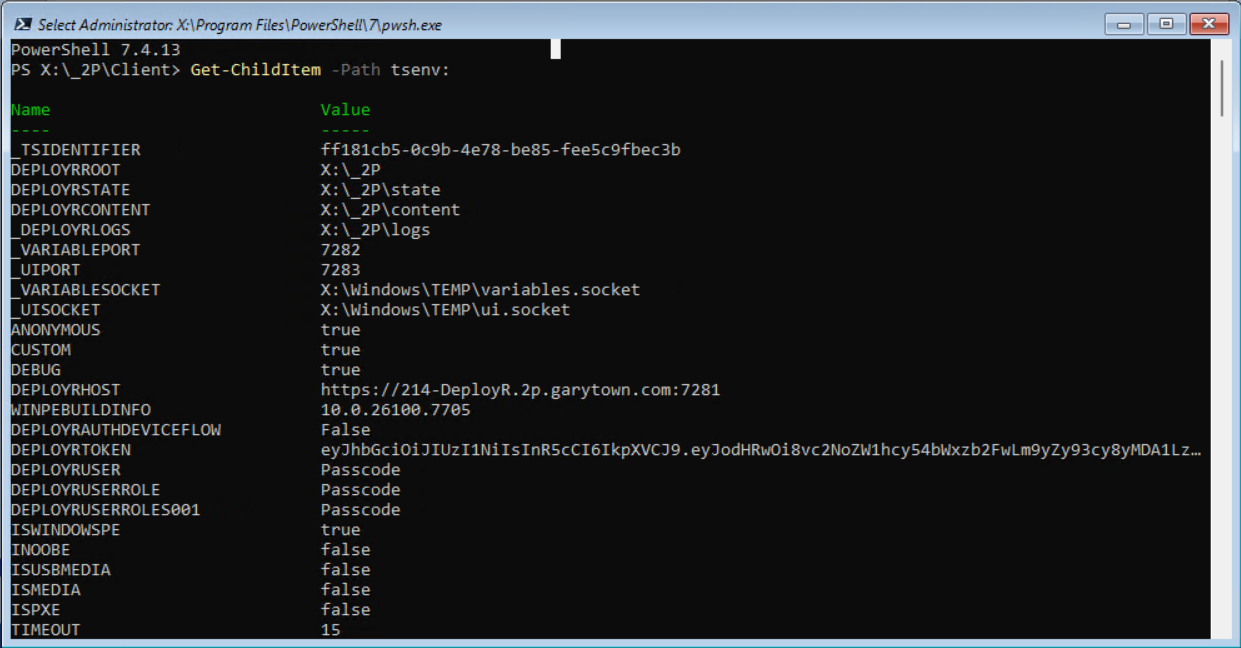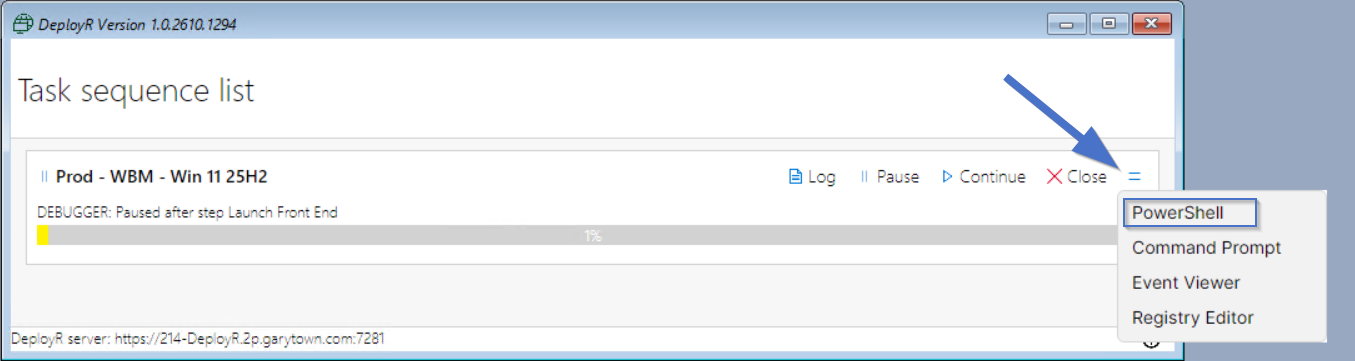
| Variable | Description | Options |
|---|---|---|
| _DEPLOYRLOGS | DeployR log location Example Value: X:\_2P\logs | Set by DeployR |
| _ENCRYPT | true | Set by DeployR |
| _LASTACTIONSUCCEEDED | TRUE/FALSE | Set by step at the end of step |
| _LASTACTIONRETURNCODE | 0 (Success) or another Number | Set by step at the end of step |
| _SEQUENCESTATE | Current task sequence state Example Value: {"f4b57e76-184a-47c4-8631-eae8cf7f4f8d":"Success","ba87d732-5df3-44c2-a98b-258123f62370":"InProgress"} | Set by DeployR |
| _SMSTSLOGPATH | X:\Windows\TEMP | Set by DeployR |
| _TSIDENTIFIER | 6f40f996-8db5-49f3-b8ca-8671ea9edf5a | Set by DeployR |
| _UIPORT | 7283 | Set by DeployR |
| _UISOCKET | X:\_2P\state\ui.socket | Set by DeployR |
| _UITSDEBUG | TRUE/FALSE | Set by running in Debug mode |
| _UITSLIST | GUIDs of task sequences | Set by DeployR |
| _VARIABLEPORT | 7282 | Set by DeployR |
| _VARIABLESOCKET | X:\_2P\state\variables.socket | Set by DeployR |
| ANONYMOUS | TRUE | Set by DeployR |
| ARCHITECTURE | x64 | Set by DeployR Gather |
| ANONYMOUS | TRUE | Set by DeployR |
| ASSETTAG | 4102-7492-9856-5816-5097-6344-26 | Set by DeployR Gather |
| BASEBOARDPRODUCT | Virtual Machine | Set by DeployR Gather |
| CHASSIS | Desktop | Set by DeployR Gather |
| CSPVERSION | Hyper-V UEFI Release v4.1 | Set by DeployR Gather |
| DEBUG | TRUE/FALSE | Set by BootStrap Config |
| DEFAULTGATEWAY001 | 192.168.10.1 | Set by DeployR Gather |
| DEPLOYR_PROCESS | This is set to the process ID of the parent DeployR client shell process. By itself that is not useful. However, PSADT (4.2 and above) will look for this value so that wrapped app installers will behave as expected when run inside a DeployR task sequence (thanks to Dan Cunningham). | This will be set by the DeployR client shell and can be seen in any task sequence step. |
| DEPLOYRAUTHDEVICEFLOW | TRUE/FALSE | Set by DeployR |
| DEPLOYRAUTHWINDOWSAUTHENTICATION | TRUE/FALSE | Set by DeployR |
| DEPLOYRCLIENTVERSION | The DeployR client version currently running in the task sequence, which was included in the boot media. | Set by DeployR |
| DEPLOYRCONTENT | X:\_2P\content | Set by DeployR |
| DEPLOYRHOST | https://deployr.corp.viamonstra.com:7281 | Set by DeployR |
| DEPLOYRROOT | X:\_2P | Set by DeployR |
| DEPLOYRSERVERVERSION | The DeployR server version, the client version and server version should match, if not, regenerate the boot media. | Set by DeployR |
| DEPLOYRSTATE | X:\_2P\state | Set by DeployR |
| DEPLOYRTASKSEQUENCEID | 00000002-0000-0000-0000-000000000001 | Set by DeployR once TS selected |
| DEPLOYRTASKSEQUENCENAME | Name of the TS currently running | Set by DeployR once TS selected |
| DEPLOYRTASKSEQUENCEVERSIONID | 8fd68264-2d37-4000-55ab-08dca0511f05 | Set by DeployR once TS selected |
| DEPLOYRTASKSEQUENCEVERSIONNO | 1 | Set by DeployR once TS selected |
| DEPLOYRTOKEN | String of the Token used for communications | Set by DeployR after Auth of the TS |
| DEPLOYRUSER | User or Method for Auth of the TS | Set by DeployR after Auth of the TS |
| DEPLOYRUSERROLE | When using Entra, a roll will be associated with the user | Set by DeployR after Auth of the TS |
| DEPLOYRUSERROLES001 | Sevearl Roles can be assigned to a user, they will show up in a list here | Set by DeployR after Auth of the TS |
| DEVELOPMENTMODE | TRUE/FALSE | Set by running in Dev mode |
| FINISHACTION | Tell the Task Sequence what to do after the TS finishes - Default is NOT Set, and does nothing. | reboot, shutdown, logoff, reseal |
| GATHERLOCALONLY | TRUE | |
| INLINE | TRUE | Set by DeployR Step |
| INPUTLOCALE | language code, ex: en-US Used by Apply OS step | Set by step: Set Windows settings |
| INOOBE | TRUE/FALSE | Set by DeployR Gather |
| IPADDRESS001 | 192.168.10.137 | Set by DeployR Gather |
| IPADDRESS002 | fe80::ef31:32ca:d547:ca8a | Set by DeployR Gather |
| ISDESKTOP | TRUE/FALSE | Set by DeployR Gather |
| ISLAPTOP | TRUE/FALSE | Set by DeployR Gather |
| ISSERVER | TRUE/FALSE | Set by DeployR Gather |
| ISSERVERCOREOS | TRUE/FALSE | Set by DeployR Gather |
| ISSERVEROS | TRUE/FALSE | Set by DeployR Gather |
| ISSFF | TRUE/FALSE | Set by DeployR Gather |
| ISTABLET | TRUE/FALSE | Set by DeployR Gather |
| ISUEFI | TRUE/FALSE | Set by DeployR Gather |
| ISUSBMEDIA | TRUE/FALSE | Set by DeployR Gather |
| ISVM | TRUE/FALSE | Set by DeployR Gather |
| ISWINDOWSPE | TRUE/FALSE | Set by DeployR Gather |
| MACADDRESS001 | 00:15:5D:A6:3A:64 | Set by DeployR Gather |
| MAKE | Microsoft Corporation | Set by DeployR Gather |
| MAKEALIAS | Microsoft | Set by DeployR Gather |
| MANUFACTURER | Microsoft Corporation | Set by DeployR Gather |
| MEMORY | 4095 | Set by DeployR Gather |
| MODEL | Virtual Machine | Set by DeployR Gather |
| MODELALIAS | Virtual Machine | Set by DeployR Gather |
| OSCURRENTBUILD | 26100 | Set by DeployR Gather |
| OSCURRENTVERSION | 10.0.26100 | Set by DeployR Gather |
| OSDSTARTTIME | Time Stamp | Set by step: Set Windows settings |
| OSSKU | Ultimate Edition | Set by DeployR Gather |
| OSVERSION | WinPE | Set by DeployR Gather |
| PEERING | Enable or Disable BranchCache P2P during Task Sequence. NoCache will use BranchCache to download but will not store the content in the BranchCache cache. Default = TRUE | Set via Variable TRUE/FALSE/ NoCache or Set by step: Set Windows settings |
| PROCESSORSPEED | 1608 | Set by DeployR Gather |
| PRODUCT | Virtual Machine | Set by DeployR Gather |
| PRODUCTKEY | YOUR MAK KEY Example: XX123-NMH47-7TTHJ-W3FW7-8HV2C | Set by User using script or set variable step |
| PROGRESSTIMEOUT | Default 300, modify to have the final Progress UI close sooner or later | Set by variable at anytime or Set by step: Set Windows settings |
| PSMODULEPATH | X:\Program Files\PowerShell\Modules;x:\program files\powershell\7\Modules;X:\Program Files\WindowsPowerShell\Modules;X:\Windows\system32\WindowsPowerShell\v1.0\Modules;X:\Program Files\PowerShell\;X:\Program Files\PowerShell\7\;X:\Windows\system32\config\systemprofile\Documents\PowerShell\Modules\ | Set by DeployR |
| SCRIPT | Set by DeployR Step | |
| SERIALNUMBER | 4102-7492-9856-5816-5097-6344-26 | Set by DeployR Gather |
| SETUPMODE | UEFI | Set by DeployR Gather |
| SUPPORTSSLAT | FALSE | Set by DeployR Gather |
| SYSTEMALIAS | Hyper-V UEFI Release v4.1 | Set by DeployR Gather |
| SYSTEMLOCALE | language code, ex: en-US Used by Apply OS step | Set by step: Set Windows settings |
| SYSTEMSKU | None | Set by DeployR Gather |
| TIMEZONE | MS Name for TimeZone, ex: "Central Standard Time" Used by Apply OS step | Set by step: Set Windows settings |
| TSID | The ID (GUID) of the task sequence to be executed. An example: 00000002-0000-0000-0000-000000000001 | Set by DeployR |
| UILANGUAGE | language code, ex: en-US Used by Apply OS step | Set by step: Set Windows settings |
| USERLOCALE | language code, ex: en-US Used by Apply OS step | Set by step: Set Windows settings |
| UUID | B4F64D47-CA2D-4030-AB3F-400E256419B1 | Set by DeployR |
| WINPEBUILDINFO | The Windows build number of WinPE. Ex: 10.0.26100.8737 | Set By DeployR |