> For the complete documentation index, see [llms.txt](https://documentation.2pintsoftware.com/llms.txt). Markdown versions of documentation pages are available by appending `.md` to page URLs; this page is available as [Markdown](https://documentation.2pintsoftware.com/deployr/setting-the-computer-name.md).
# Setting the computer name
Set [COMPUTERNAME](/deployr/task-sequence-variables.md) before **Apply OS** to use a custom name during deployment. Alternatively, use `Rename-Computer` in the full OS to rename the device afterward.
**Windows PE:** The temporary computer name begins with `OSD`.\
**Apply OS:** When `COMPUTERNAME` is unset, this step uses the default `Defaults.json` template: `PC-%RAND:10%`. Setting `COMPUTERNAME` before this step overrides that template.
### Using PowerShell:
See [Set Computer Name with Script](/deployr/scripting/scripting-for-osd/simple-prompt-for-computer-name.md) for a complete example. Set the task sequence variable to the required computer name.
```powershell
${TSEnv:ComputerName} = CUSTOMNAME # 15 characters or fewer
```
This example creates a unique name from the device serial number. It adds the `PC-` prefix and retains the final 12 serial-number characters. The result stays within the 15-character Windows computer-name limit.
```powershell
# Generate a computer name from the serial number
$Prefix = "PC-"
$SerialNumber = ${TSEnv:SerialNumber}
if ($SerialNumber.Length -gt 12) {
$SerialNumber = $SerialNumber.Substring($SerialNumber.Length - 12)
}
$ComputerName = $Prefix + $SerialNumber
${TSEnv:ComputerName} = $ComputerName
```
### Using Set variable step
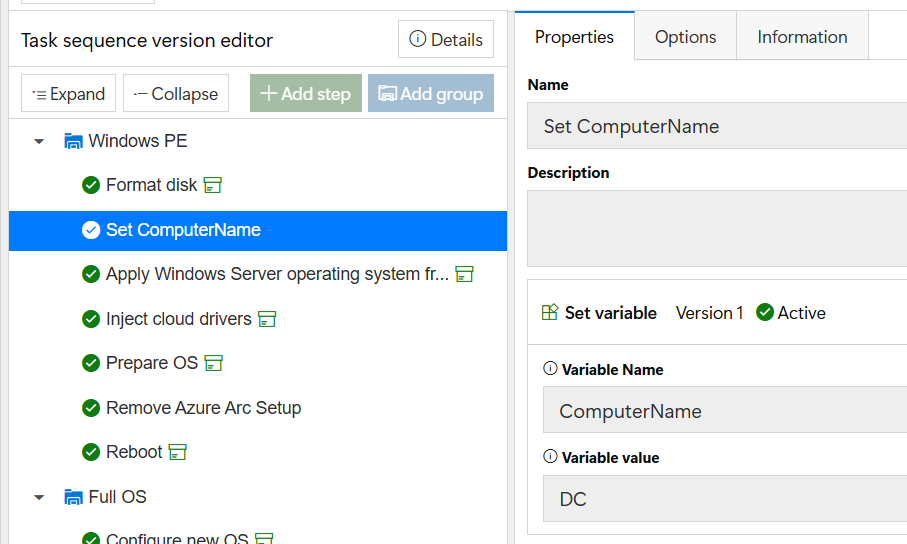
You can use a **Set variable** step to assign a fixed name. This example names the computer `DC` for a lab domain controller.
{% hint style="warning" %}
A **Set variable** step assigns the same name on every run. Use a script for unique names based on a serial number, asset tag, or similar value.
{% endhint %}
Set the variable before **Apply Windows**. The task sequence then uses it in the unattended file.
### PowerShell Function Rename-Computer in Full OS
Use the built-in `Rename-Computer` function after the full OS loads. The following example uses a Hyper-V virtual machine name for the device name.
```powershell
function Get-HyperVName {
[CmdletBinding()]
param ()
if ($env:SystemDrive -eq 'X:'){
Write-host "Unable to get HyperV Name in WinPE"
}
else{
if (((Get-CimInstance Win32_ComputerSystem).Model -eq "Virtual Machine") -and ((Get-CimInstance Win32_ComputerSystem).Manufacturer -eq "Microsoft Corporation")){
$HyperVName = Get-ItemPropertyValue -Path 'HKLM:\SOFTWARE\Microsoft\Virtual Machine\Guest\Parameters' -Name "VirtualMachineName" -ErrorAction SilentlyContinue
}
return $HyperVName
}
}
function Set-HyperVName {
[CmdletBinding()]
param ()
$HyperVName = Get-HyperVName
Write-Output "Renaming Computer to $HyperVName"
Rename-Computer -NewName $HyperVName -Force
}
try {Set-HyperVName}
catch{}
```
### Offline Domain Join
Set `COMPUTERNAME` before the **Offline Domain Join** step to ensure it's being joined as the desired name.
{% hint style="info" %}
Active Directory domain members cannot use names containing only numerals. This is a DNS restriction. For details, see [Microsoft naming conventions](https://learn.microsoft.com/en-us/troubleshoot/windows-server/active-directory/naming-conventions-for-computer-domain-site-ou).
{% endhint %}
---
# Agent Instructions
This documentation is published with GitBook. GitBook is the documentation platform designed so that both humans and AI agents can read, navigate, and reason over technical content effectively. Learn more at gitbook.com.
## Querying This Documentation
If you need additional information that is not directly available in this page, you can query the documentation dynamically by asking a question.
Perform an HTTP GET request on the current page URL with the `ask` query parameter, and the optional `goal` query parameter:
```
GET https://documentation.2pintsoftware.com/deployr/setting-the-computer-name.md?ask=&goal=
```
`ask` is the immediate question: it should be specific, self-contained, and written in natural language.
`goal` is optional and describes the broader end goal you are ultimately trying to accomplish on behalf of the user. GitBook uses it to tailor the answer towards what is most useful for that goal.
The response will contain a direct answer to the question and relevant excerpts and sources from the documentation.
Use this mechanism when the answer is not explicitly present in the current page, you need clarification or additional context, or you want to retrieve related documentation sections.