> For the complete documentation index, see [llms.txt](https://documentation.2pintsoftware.com/llms.txt). Markdown versions of documentation pages are available by appending `.md` to page URLs; this page is available as [Markdown](https://documentation.2pintsoftware.com/stifler/operations-and-features/overview-and-navigation/network-topology/network-groups.md).
# Network groups
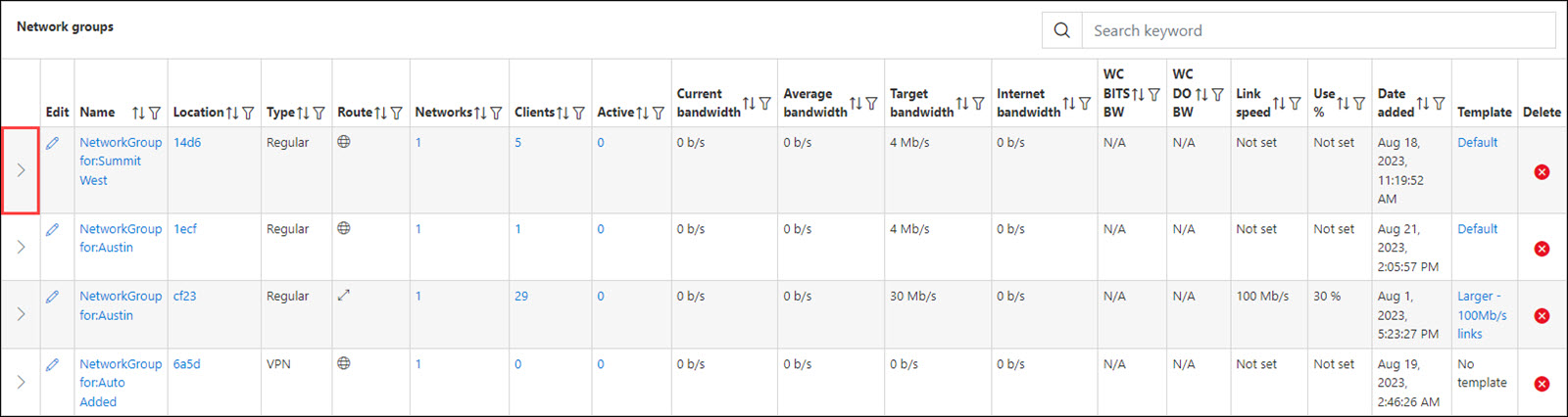
The **Network Groups** section of the Dashboard is used to search for and manage the network groups that StifleR supports.
A network group in StifleR contains one or more networks. For example, this might represent a group of well-connected subnets.
## Network groups list
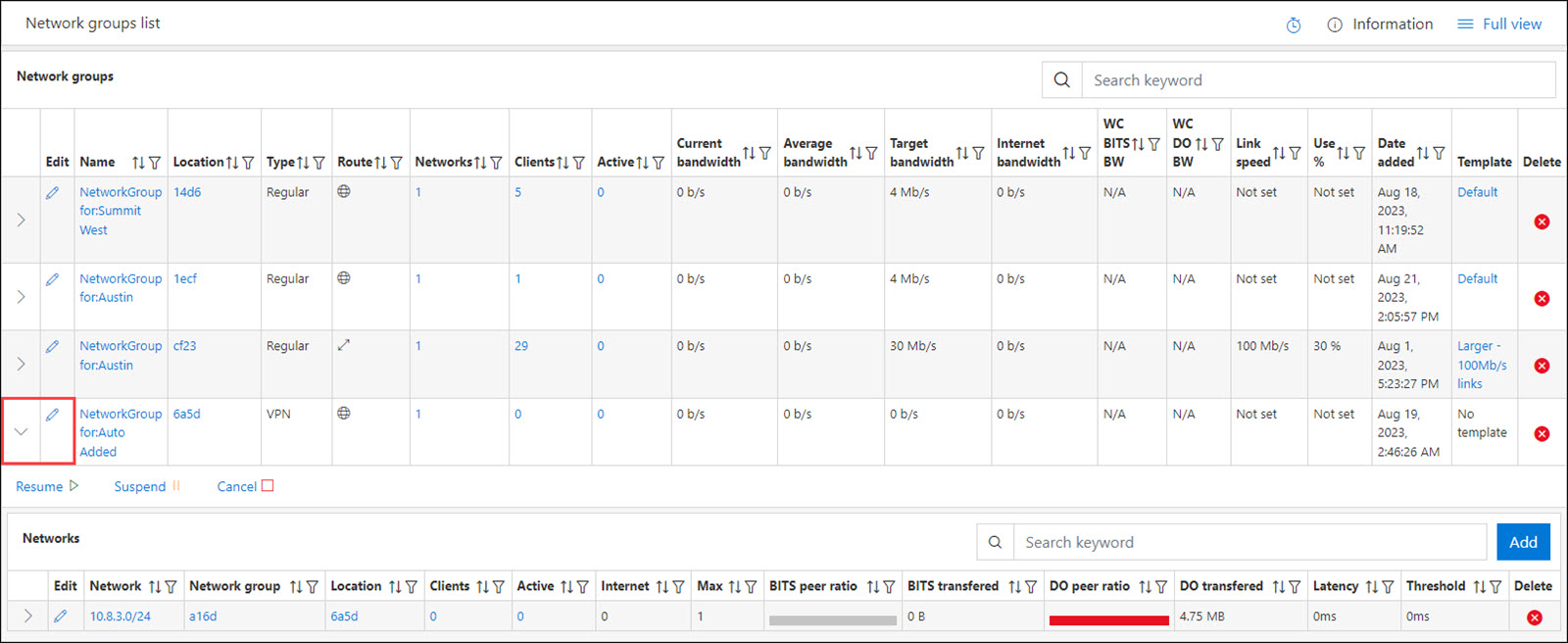
The Network groups list will display all of the network groups. To view the networks assigned to the location, select the **arrow** next to the Name.
This will display the [Networks](/stifler/operations-and-features/overview-and-navigation/network-topology/networks.md) associated with the location. You can drill down further to display the assigned Networks or select the **Edit icon** to modify the [Network](/stifler/operations-and-features/overview-and-navigation/network-topology/networks.md).
If interested in editing a network group, see the [Templates](/stifler/operations-and-features/overview-and-navigation/devices/stifler-server/templates-detail.md) page for more information about available settings.
## Supernetting
Supernetting allows StifleR to define and manage networks at a higher level by using aggregated network ranges instead of individual subnets. Rather than specifying each subnet separately, administrators can define a single supernet using CIDR or subnet mask notation, and StifleR will automatically apply that definition to all networks that fall within the specified range.
With supernetting, network definitions can be entered using a combined IP address and mask (for example, 10.10.0.0/16 or 192.168.0.0/255.255.0.0), simplifying configuration and reducing administrative overhead. Any subnet that exists within the defined supernet is automatically matched and handled according to the network group configuration.
This capability is particularly useful when skipping networks or grouping large address spaces. For example, defining a supernet such as 192.168.0.0/16 ensures that all 192.168.x.x networks are covered without requiring each subnet to be listed individually. When a client reports in from a subnet within the supernet range, StifleR dynamically generates the corresponding subnet under the network group and applies the appropriate rules.
Supernetting works consistently across both VPN and non-VPN scenarios, enabling flexible and scalable network grouping while maintaining accurate network detection and control.
---
# Agent Instructions
This documentation is published with GitBook. GitBook is the documentation platform designed so that both humans and AI agents can read, navigate, and reason over technical content effectively. Learn more at gitbook.com.
## Querying This Documentation
If you need additional information that is not directly available in this page, you can query the documentation by asking a question.
Perform an HTTP GET request on the following URL with the `ask` and `goal` query parameters:
```
GET https://documentation.2pintsoftware.com/stifler/operations-and-features/overview-and-navigation/network-topology/network-groups.md?ask=&goal=
```
`ask` is the immediate question: it should be specific, self-contained, and written in natural language.
`goal` is what the user is ultimately trying to achieve, the reason they need the answer. Sharing it helps GitBook give you a better, more relevant answer. A goal is most helpful when it describes the outcome the user wants rather than restating the question. For example, with `ask=how do I create an API token`, a goal like `automate deployments from our CI pipeline` lets GitBook tailor the answer to that use case.
The response will contain a direct answer to the question and relevant excerpts and sources from the documentation.
Use this mechanism when the answer is not explicitly present in the current page, you need clarification or additional context, or you want to retrieve related documentation sections.