> For the complete documentation index, see [llms.txt](https://documentation.2pintsoftware.com/llms.txt). Markdown versions of documentation pages are available by appending `.md` to page URLs; this page is available as [Markdown](https://documentation.2pintsoftware.com/deployr/reference/step-definitions/set-windows-settings.md).
# Set Windows settings
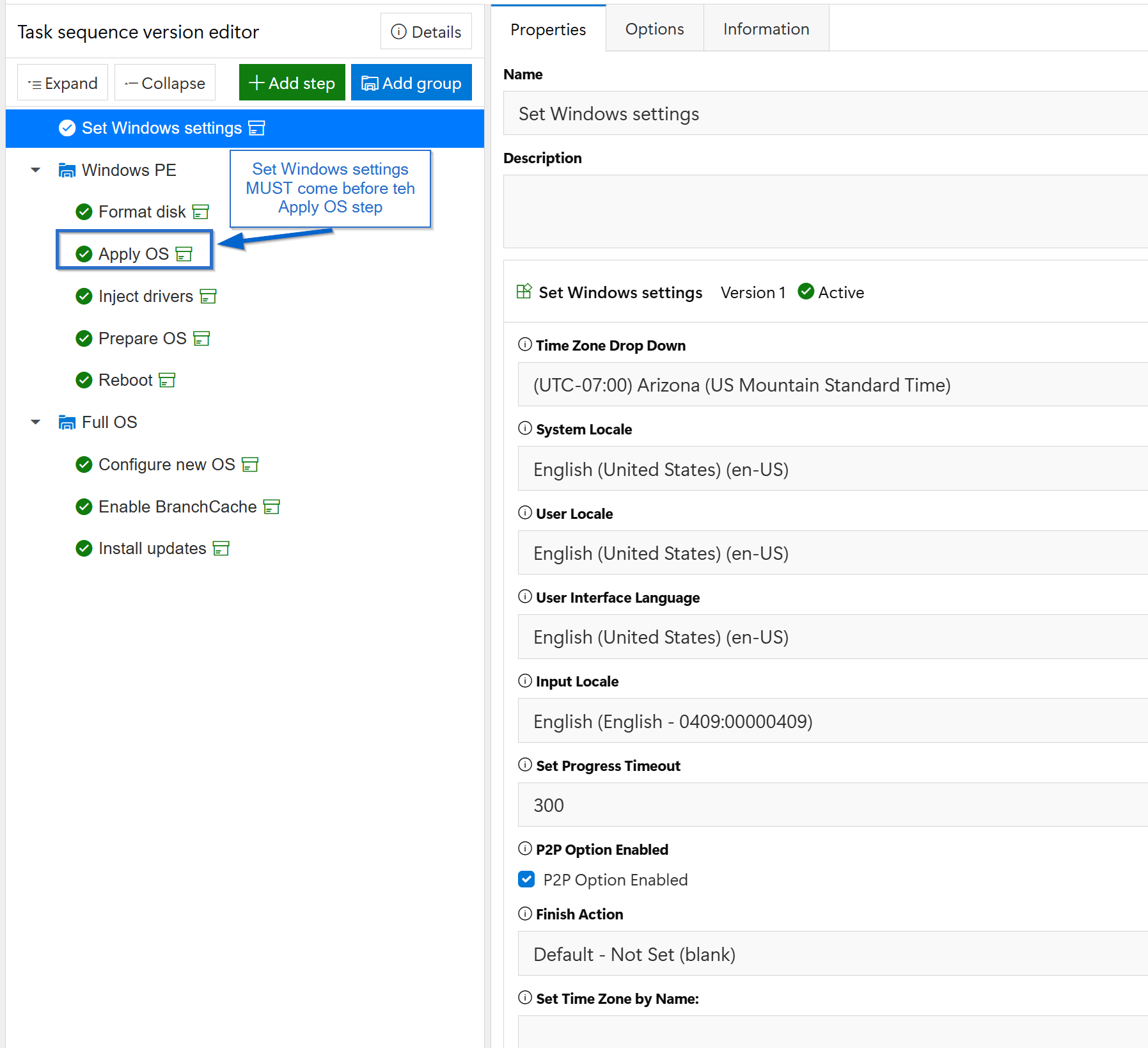
This step helps you set initial variables for your task sequence. Add it at the beginning of the task sequence. Starting with DeployR 1.4, it is included in the Windows bare metal, build and capture, and refresh templates. Many of these variables are used by the **Apply operating system** step, so you must run this step first. The **Apply operating system** step collects these variables, along with others, and uses them to populate the `unattend.xml` file. If you specify different languages here but do not include them in your installation WIM, the results may be unexpected.
Some settings, such as the time zone, may be reset during the Autopilot reseal process. The following variables can be set for the task sequence environment:
* Peering (`true` to use P2P during the task sequence, `false` to turn it off, or `NoCache` to download from peers without caching the content on this device).
* FinishAction (reboot, shutdown, logoff, reseal (for Autopilot), resealshutdown, nothing). **resealshutdown**, added to the list in DeployR 1.4, reseals the device (`sysprep /oobe`) and then shuts it down instead of restarting it.
* ProgressTimeout (how long the progress UI stays on the success screen after the task sequence completes)
For more details about these variables, see [Task Sequence variables](/deployr/reference/task-sequence-variables.md)
### Options
| Option | Description |
| ----------------------- | ------------------------------------------------------------------------------------------------------------------------------------------------------------------------------------------------------------------------------------------------------------------------------ |
| Time Zone Drop Down | Time zone for the new OS. Sets the `TIMEZONE` variable. Default: **US Mountain Standard Time**. When the step runs in the full OS, the time zone is also changed immediately. |
| System Locale | Sets the `SYSTEMLOCALE` variable. Default: `en-US`. |
| User Locale | Sets the `USERLOCALE` variable. Default: `en-US`. |
| User Interface Language | Sets the `UILANGUAGE` variable. The language must be in the image, or added with the [Install online language pack](/deployr/reference/step-definitions/install-online-language-pack.md) step. Default: `en-US`. |
| Input Locale | Keyboard layout. Sets the `INPUTLOCALE` variable. Default: **English - 0409:00000409**. |
| Set Progress Timeout | Number of seconds the progress UI stays open after the task sequence completes. Sets the `PROGRESSTIMEOUT` variable. Default: `300`. |
| P2P Option | **Enabled**, **Disabled**, or **No caching**. Sets the `PEERING` variable to `true`, `false`, or `NoCache`. Default: **Enabled**. |
| Finish Action | What happens when the task sequence completes successfully: **Shutdown**, **Reboot**, **Reseal and restart (For Autopilot)**, **Reseal and shutdown (For Autopilot)**, **Logoff**, or **Default - Not Set**. Sets the `FINISHACTION` variable. Default: **Default - Not Set**. |
| Set Time Zone by Name: | A Windows time zone name to use instead of the drop-down list, for one that is not listed. See [Default time zones](https://learn.microsoft.com/en-us/windows-hardware/manufacture/desktop/default-time-zones). When set, it takes precedence over the drop-down list. |
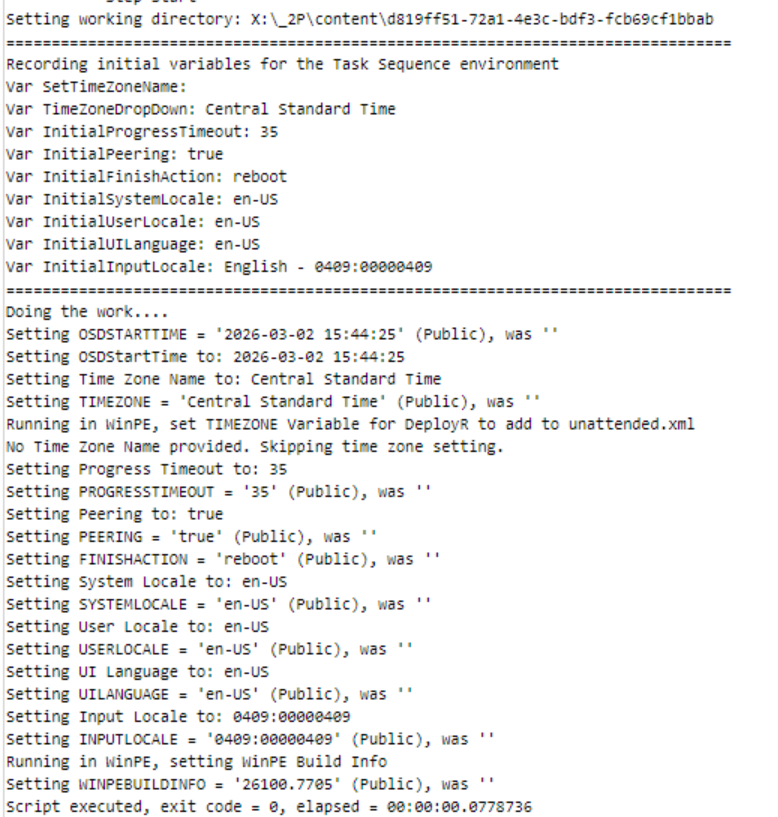
When watching in the log, you will see the variables being set:
---
# Agent Instructions
This documentation is published with GitBook. GitBook is the documentation platform designed so that both humans and AI agents can read, navigate, and reason over technical content effectively. Learn more at gitbook.com.
## Querying This Documentation
If you need additional information that is not directly available in this page, you can query the documentation by asking a question.
Perform an HTTP GET request on the following URL with the `ask` and `goal` query parameters:
```
GET https://documentation.2pintsoftware.com/deployr/reference/step-definitions/set-windows-settings.md?ask=&goal=
```
`ask` is the immediate question: it should be specific, self-contained, and written in natural language.
`goal` is what the user is ultimately trying to achieve, the reason they need the answer. Sharing it helps GitBook give you a better, more relevant answer. A goal is most helpful when it describes the outcome the user wants rather than restating the question. For example, with `ask=how do I create an API token`, a goal like `automate deployments from our CI pipeline` lets GitBook tailor the answer to that use case.
The response will contain a direct answer to the question and relevant excerpts and sources from the documentation.
Use this mechanism when the answer is not explicitly present in the current page, you need clarification or additional context, or you want to retrieve related documentation sections.