> For the complete documentation index, see [llms.txt](https://documentation.2pintsoftware.com/llms.txt). Markdown versions of documentation pages are available by appending `.md` to page URLs; this page is available as [Markdown](https://documentation.2pintsoftware.com/deployr/reference/step-definitions/install-ubuntu-desktop-from-nfs.md).
# Install Ubuntu Desktop from NFS
{% hint style="info" %}
This is only supported in DeployR Enterprise. Applies to: DeployR 1.1 and later.
{% endhint %}
The **Install Ubuntu Desktop from NFS** step is similar to the [Install Ubuntu Desktop from ISO](/deployr/reference/step-definitions/install-ubuntu-desktop-from-iso.md) step. Instead of downloading the entire ISO, it retrieves the required installation files (a copy of the ISO contents) from an NFS share.
To create this NFS share on Windows, first install the **Server for NFS** role under **File and Storage Services** in Server Manager. Once installed, you can give the NFS share any name; the path should be resolvable from the boot image (e.g. using a DNS name that can be resolved, or an IP address of the server). This does not need to be on the DeployR server itself.
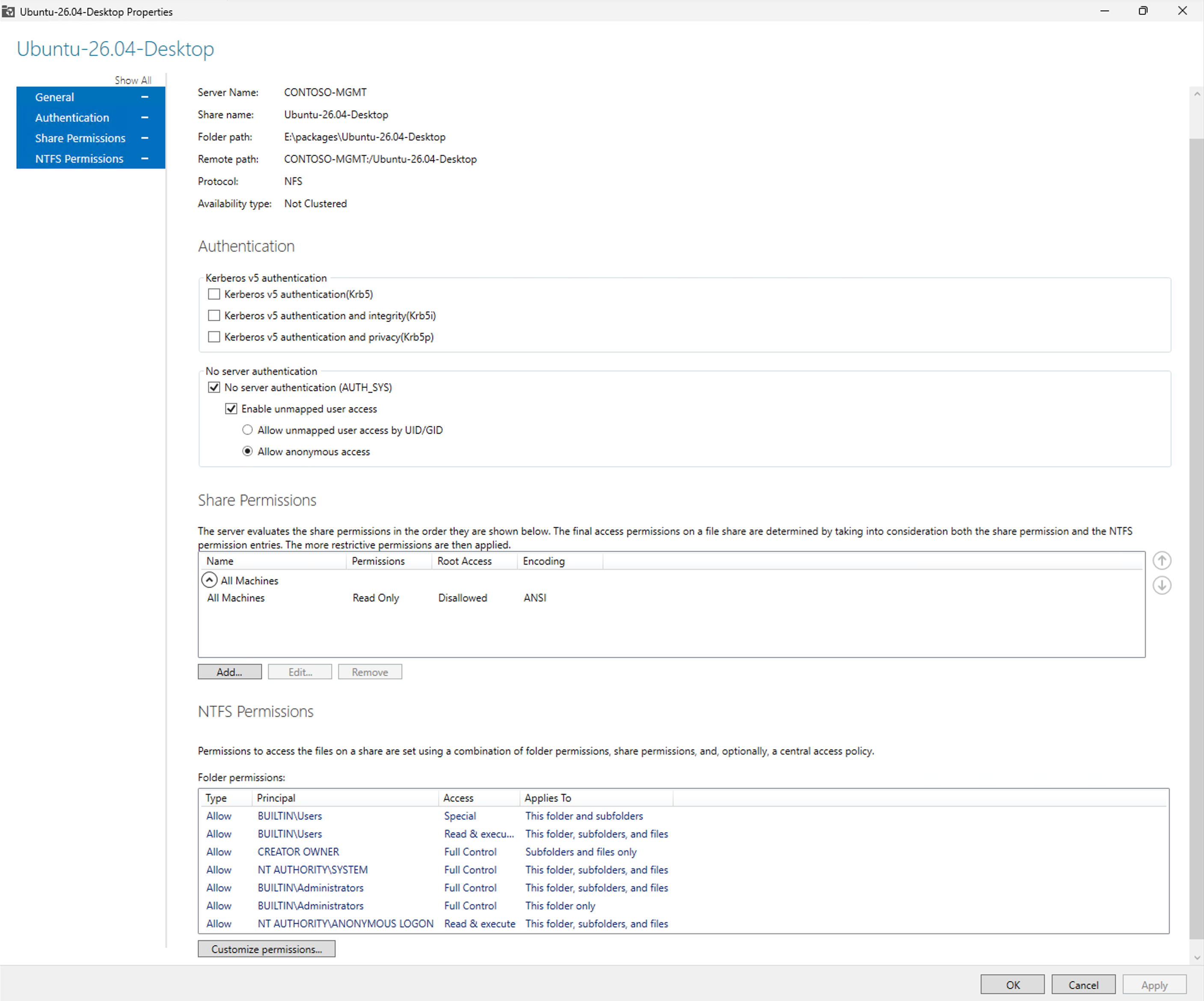
When creating the NFS share, specific settings are needed for the Linux installation environment to access the share. No server authentication can be enabled, and anonymous access must be allowed. Read-only access is sufficient. NTFS permissions also need to be modified to ensure "NT AUTHORITY\ANONYMOUS LOGON" has read and execute permissions to the contents of the NFS share.
### Options
| Option | Description |
| ------------------------------------------- | ------------------------------------------------------------------------------------------------------------------------------------------- |
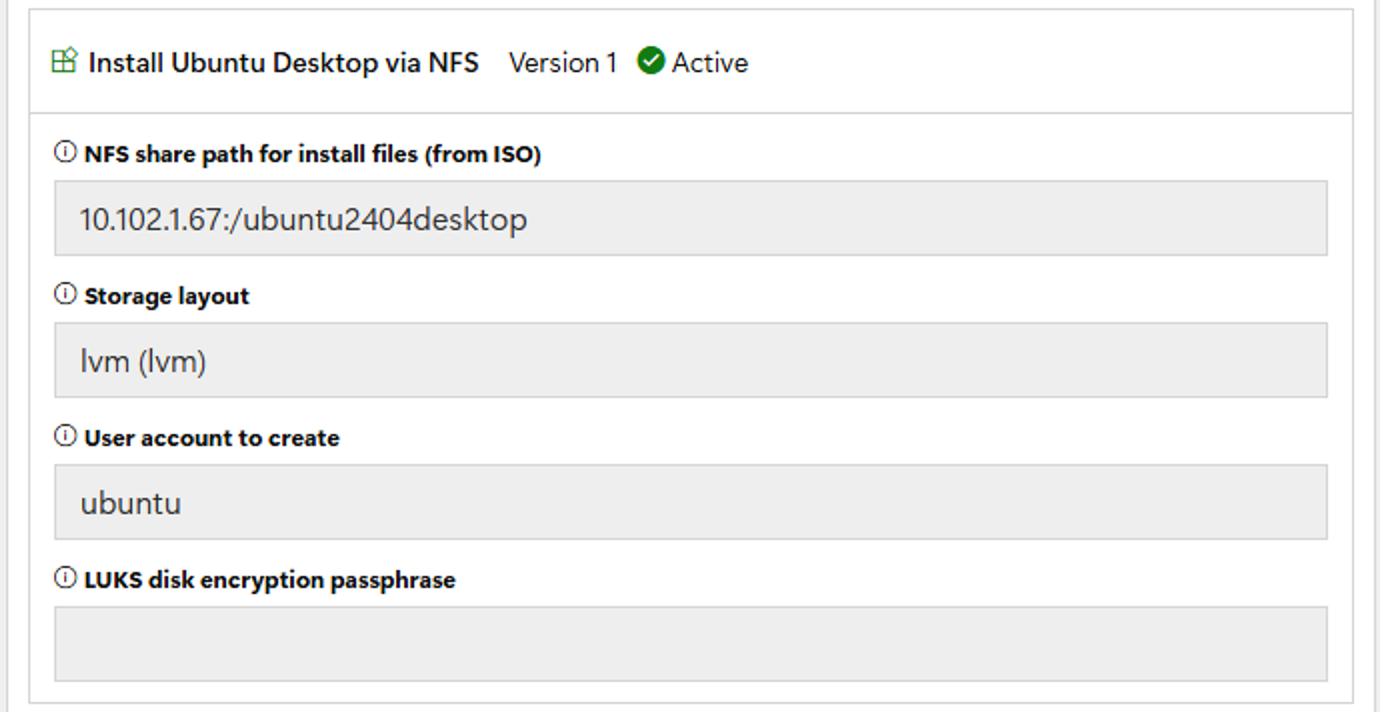
| NFS share path for install files (from ISO) | NFS path of the extracted Ubuntu ISO, for example `10.10.10.10:/Ubuntu`. |
| Storage layout | `lvm` (default), `direct`, or `zfs`. Use `lvm` if you want LUKS encryption. |
| User account to create | Local account to create, with sudo access. Default: `ubuntu`. The password comes from the `AdminPassword` secret or task sequence variable. |
| LUKS disk encryption passphrase | Optional. Encrypts the disk with LUKS; Ubuntu prompts for this passphrase at startup. |
Since the needed boot files can be easily obtained from the NFS share itself, no separate content item is needed for those files. Since the entire ISO is not downloaded into a RAMdisk, less memory is required; see the Ubuntu Desktop documentation for recommended and minimum values.
---
# Agent Instructions
This documentation is published with GitBook. GitBook is the documentation platform designed so that both humans and AI agents can read, navigate, and reason over technical content effectively. Learn more at gitbook.com.
## Querying This Documentation
If you need additional information that is not directly available in this page, you can query the documentation by asking a question.
Perform an HTTP GET request on the following URL with the `ask` and `goal` query parameters:
```
GET https://documentation.2pintsoftware.com/deployr/reference/step-definitions/install-ubuntu-desktop-from-nfs.md?ask=&goal=
```
`ask` is the immediate question: it should be specific, self-contained, and written in natural language.
`goal` is what the user is ultimately trying to achieve, the reason they need the answer. Sharing it helps GitBook give you a better, more relevant answer. A goal is most helpful when it describes the outcome the user wants rather than restating the question. For example, with `ask=how do I create an API token`, a goal like `automate deployments from our CI pipeline` lets GitBook tailor the answer to that use case.
The response will contain a direct answer to the question and relevant excerpts and sources from the documentation.
Use this mechanism when the answer is not explicitly present in the current page, you need clarification or additional context, or you want to retrieve related documentation sections.