> For the complete documentation index, see [llms.txt](https://documentation.2pintsoftware.com/llms.txt). Markdown versions of documentation pages are available by appending `.md` to page URLs; this page is available as [Markdown](https://documentation.2pintsoftware.com/deployr/integrations/peering-and-content-basics.md).

# Peering & Content Basics

## Overview

{% hint style="info" %}
Peer-to-peer content distribution is only supported in DeployR Enterprise.
{% endhint %}

By default, DeployR uses peer-to-peer content distribution based on BranchCache and the 2Pint-built BranchCache Alternate Content Provider (BCACP).

All content served by the DeployR server uses BCACP by default. No additional configuration is required.

DeployR converts uploaded content items into WIM files to improve deployment efficiency and peer-to-peer distribution.

The only prerequisite is to enable BranchCache on the DeployR server.

```powershell
Install-WindowsFeature BranchCache
```

## Content as WIMs (vs Zip or Uncompressed)

Why did 2Pint decide to use the WIM format for DeployR Content?

Windows Imaging Format (WIM) offers several advantages over ZIP archives or uncompressed files, particularly in enterprise scenarios involving DeployR, the 2Pint Software OSD Tool, for software deployments. These benefits stem from WIM's native integration with Windows and its file-based structure (which supports single-instancing for deduplication).

1. Superior Integration with BranchCache for Network Efficiency BranchCache identifies and caches identical content blocks across files, enabling peers to share data and minimize downloads from distribution points. WIM excels here due to its compression compatibility and single-instancing (storing duplicate files only once within the archive), which creates more identifiable common blocks than ZIP or uncompressed formats.

| Aspect                         | WIM                                                                                                                                                          | ZIP                                                                                                          |                                                                                                    |
| ------------------------------ | ------------------------------------------------------------------------------------------------------------------------------------------------------------ | ------------------------------------------------------------------------------------------------------------ | -------------------------------------------------------------------------------------------------- |
| Deduplication Efficiency       | High: Single-instancing and LZX compression yield excellent block matching, reducing redundant data transfers by up to 50-70% in tests with driver packages. | Moderate: DEFLATE compression works but lacks single-instancing, leading to poorer block reuse across files. | Poor: No compression means larger files with no inherent block optimization, increasing WAN usage. |
| P2P (Peer-to-Peer) Performance | Optimized: Better hash-based chunking aligns with BranchCache's content identification, speeding up OSD (OS Deployment) in remote sites.                     | Adequate: Supports BranchCache but with lower efficiency for large, similar payloads.                        | Minimal: Full file transfers without caching benefits, causing high latency in branch offices.     |
| Example Impact                 | In DeployR OSD for drivers, WIM reduces download sizes via BranchCache more effectively than ZIP.                                                            | ZIP is viable but requires full extraction, negating some P2P gains during deployment.                       |                                                                                                    |

| No savings; ideal for tiny payloads only. |
| ----------------------------------------- |

This makes WIM ideal for deploying large applications (e.g., 10-30 GB installs) in bandwidth-constrained environments, as seen in real-world DeployR setups.

2. Reduced Disk Space and Client Cache Usage in Deployments WIM files can be mounted directly without full extraction, allowing installations to read files on-the-fly. This contrasts with ZIP (which requires unpacking to a temp folder) and uncompressed files (which consume full space immediately).

<table><thead><tr><th>Aspect</th><th>WIM</th><th width="187">ZIP</th><th>Uncompressed</th></tr></thead><tbody><tr><td>Cache/Storage Savings</td><td>Significant: No extraction needed.</td><td>Moderate: Compresses well but extraction doubles space needs temporarily</td><td>None: Full size from the start, bloating client caches.</td></tr><tr><td>Deployment Speed</td><td>Faster: Mounting takes seconds (e.g., 20s for 13 GB), enabling quick installs without I/O overhead from small-file copies.</td><td>Slower: Extraction adds time and disk thrashing for large apps.</td><td>Fastest access but slowest transfer due to size.</td></tr><tr><td>Example Impact</td><td>In DeployR, WIM avoids expanding content, saving time and disk space.</td><td>Useful for simple archiving but inefficient for repeated large deploys.</td><td>Only suitable for small, non-repetitive files</td></tr></tbody></table>

For software deployments with very large build & capture WIMs that might include large applications like Autodesk or LabVIEW, WIM's mount-only approach shortens OSD task sequence build times.

## .GENCI - BranchCache Hash File

As you create content items and they are retrieved by the DeployR Task Sequence deployments, the DeployR server has the BranchCache component create the hash file required for BranchCache. This file is stored with the content item, using the same name with a .genci extension. Each time the content item is modified, this file will be regenerated to accommodate the change in content.

To confirm the file has been created for a content item, ensure a deployment has run at least once that calls for that content item, then look in the content item folder for the .genci file.

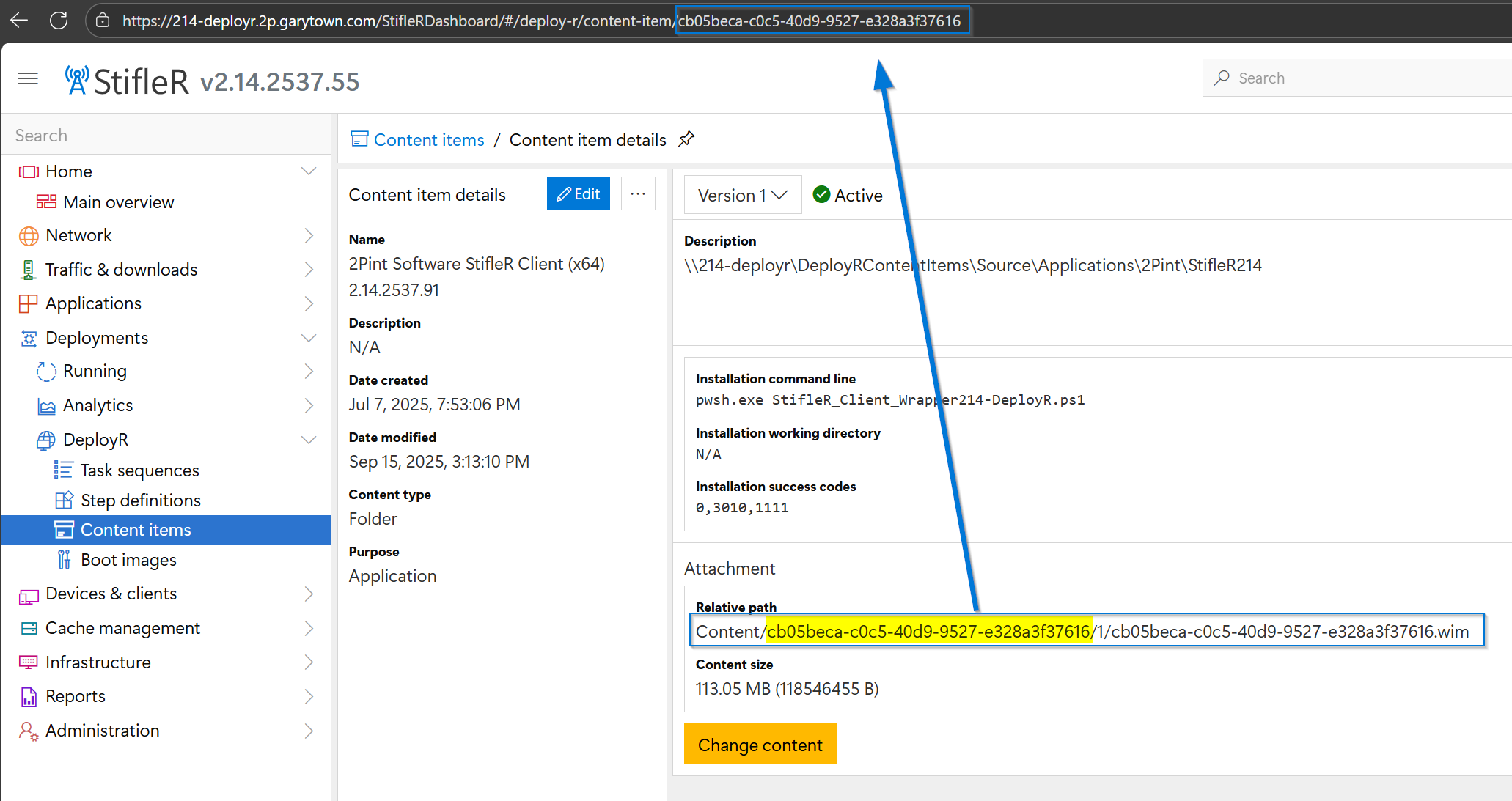
To find where the content item lives on the DeployR server, find the content item in the dashboard, then find the "Relative path" for the content. Handy tip: the URL for the content item matches the path.

<figure><img src="https://content.gitbook.com/content/8m0VARX9oyZ2zXWCdPgr/blobs/vdhz6kxEQ80zfChsY4m6/image.png" alt=""><figcaption></figcaption></figure>

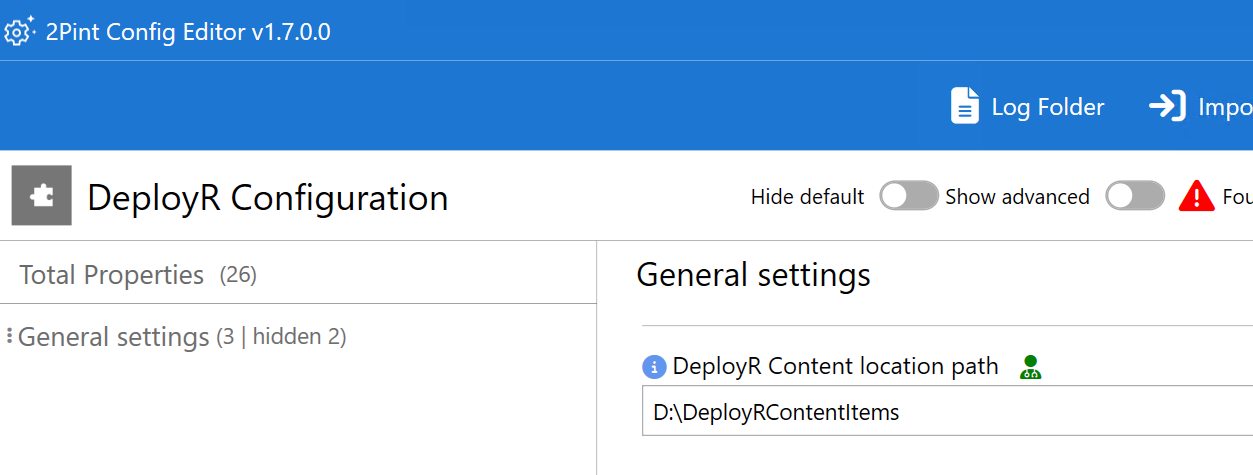
Wherever the DeployR content location path was configured, that is where you will find it. In this example, the DeployR content location is set to D:\DeployRContentItems, the default is in ProgramData.

<figure><img src="https://content.gitbook.com/content/8m0VARX9oyZ2zXWCdPgr/blobs/E2AO5RkgszZimDzYKQsk/image.png" alt=""><figcaption></figcaption></figure>

When you add those two information chunks together, you will find the content item in File Explorer.

<figure><img src="https://content.gitbook.com/content/8m0VARX9oyZ2zXWCdPgr/blobs/8xmbn6qVANoRr8RRuiSe/image.png" alt=""><figcaption></figcaption></figure>

Pro tip: 7-Zip is an easy way to open the WIM file and poke around. Do NOT modify the WIM file directly!

## Task Sequence Demo

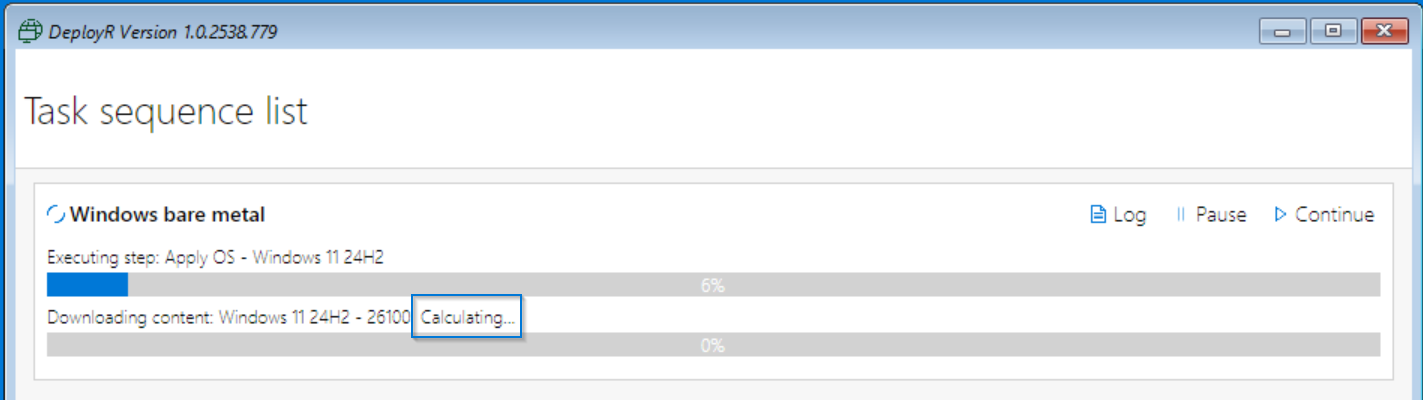
When the task sequence requests content, it first shows "Calculating" while it checks for peers and reads the hash.

<figure><img src="https://content.gitbook.com/content/8m0VARX9oyZ2zXWCdPgr/blobs/ivfEV4NqlIfXMIVRz52Q/image.png" alt=""><figcaption></figcaption></figure>

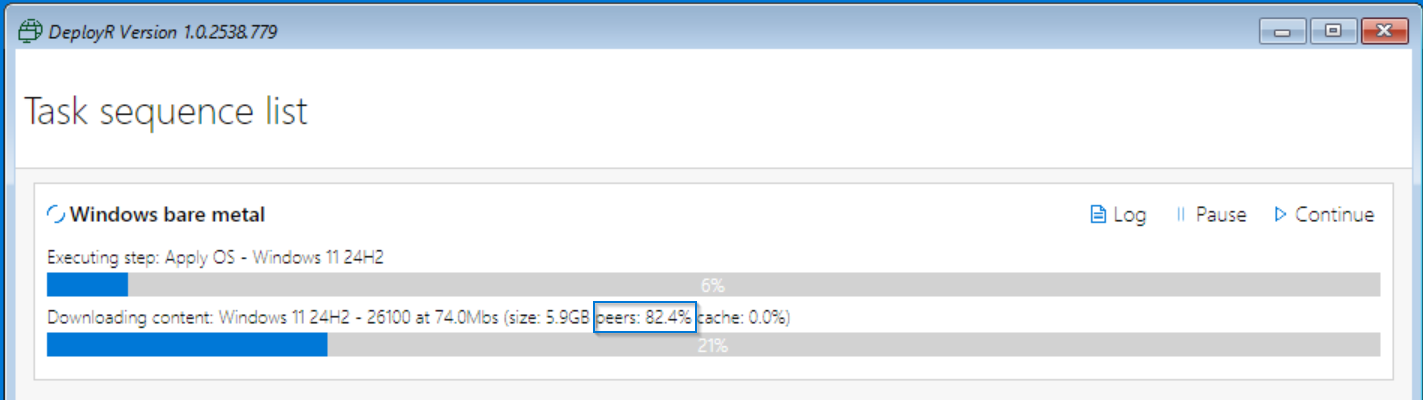
Once that stage is complete, it starts the download with BCACP and shows the P2P percentage.

<figure><img src="https://content.gitbook.com/content/8m0VARX9oyZ2zXWCdPgr/blobs/zUdmICx7BawlBg39mE6s/image.png" alt=""><figcaption></figcaption></figure>

In the Log, you will see the details once it is complete:

<figure><img src="https://content.gitbook.com/content/8m0VARX9oyZ2zXWCdPgr/blobs/ZpBkPkaL2Y97CdVyqZLo/image.png" alt=""><figcaption></figcaption></figure>

## Disable P2P Option

### Why Disable P2P?

There are times when disabling P2P might be useful. Examples of when disabling P2P might be advantageous:

* Labs, where everything runs in Hyper-V with very fast connections between the DeployR server and all test machines.
* OSD build rooms with a dedicated DeployR server. Similar to the above: all devices being deployed have a fast connection to the DeployR server, and the server is sized appropriately to handle high volume (fast disk I/O and a fast network).

### How to Disable P2P?

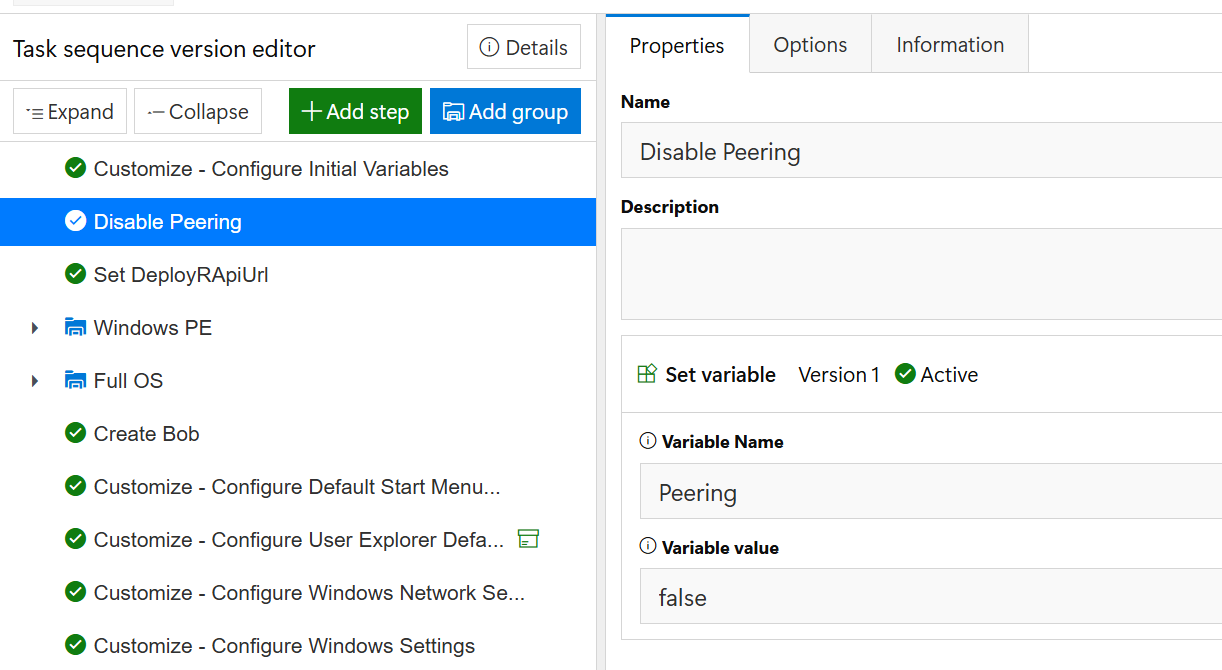
Disabling the P2P option is done at the task sequence level by setting a task sequence variable.

<figure><img src="https://content.gitbook.com/content/8m0VARX9oyZ2zXWCdPgr/blobs/RmSFsRsKscqLhHG3mItY/image.png" alt=""><figcaption></figcaption></figure>

PowerShell Script:

```powershell
${TSEnv:Peering} = false
```

## No Caching Option

### What is the no caching option?

The no caching option will instruct the DeployR downloader to download the content using BranchCache but not store the content in the BranchCache cache. This is useful for very large applications, because caching them would add to the overall deployment time. This can be set by using the same **Peering** variable with the value of **NoCache**. It can be enabled in the Task Sequence before large application installs, and then switched back to the previous value after the installs.


---

# Agent Instructions
This documentation is published with GitBook. GitBook is the documentation platform designed so that both humans and AI agents can read, navigate, and reason over technical content effectively. Learn more at gitbook.com.

## Querying This Documentation
If you need additional information that is not directly available in this page, you can query the documentation by asking a question.

Perform an HTTP GET request on the following URL with the `ask` and `goal` query parameters:

```
GET https://documentation.2pintsoftware.com/deployr/integrations/peering-and-content-basics.md?ask=<question>&goal=<user_goal>
```

`ask` is the immediate question: it should be specific, self-contained, and written in natural language.
`goal` is what the user is ultimately trying to achieve, the reason they need the answer. Sharing it helps GitBook give you a better, more relevant answer. A goal is most helpful when it describes the outcome the user wants rather than restating the question. For example, with `ask=how do I create an API token`, a goal like `automate deployments from our CI pipeline` lets GitBook tailor the answer to that use case.

The response will contain a direct answer to the question and relevant excerpts and sources from the documentation.

Use this mechanism when the answer is not explicitly present in the current page, you need clarification or additional context, or you want to retrieve related documentation sections.