> For the complete documentation index, see [llms.txt](https://documentation.2pintsoftware.com/llms.txt). Markdown versions of documentation pages are available by appending `.md` to page URLs; this page is available as [Markdown](https://documentation.2pintsoftware.com/deployr/1.2/setup-deployr-enterprise/internet-access-or-disconnected-mode.md).
# Internet access | Disconnected mode
{% hint style="info" %}
This is only supported in DeployR Enterprise.
{% endhint %}
DeployR is intended to operate in an environment where the DeployR server is able to access and download content from the internet.
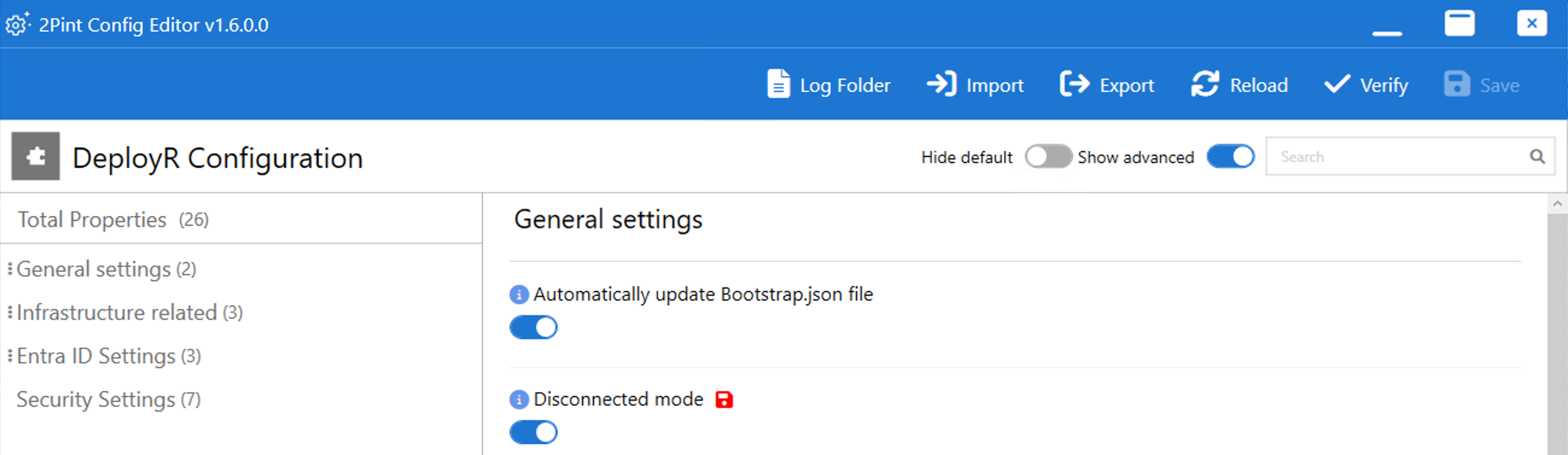
In cases where the DeployR server is unable to access the internet, Disconnected Mode can be configured in the DeployR configuration editor. Slide the "Show advanced" toggle to enable to have the Disconnected Mode option become visable in the editor.
When this is enabled, the DeployR server will not attempt to download content from the internet (with some exceptions, as noted below). Instead, the DeployR administrator needs to download the content from a separate computer that does have internet access. This can be done using the following process:
1. Copy the "C:\Program Files\2Pint Software\DeployR\WebServer\Scripts\Download.ps1" to a location that is accessible on the computer with internet access (copy to a USB key, network share, etc.).
2. Ensure PowerShell 7.4.11 (or higher version of 7.4, not 7.5.X) is installed on the computer with internet access. Run "pwsh.exe" on that computer to start a PowerShell 7 session.
3. Execute the "Download.ps1" file specifying a "-DownloadLocation" parameter with the path to receive the downloaded files.\

4. When the downloads have completed, the resulting folder should appear like this:\

5. Copy the entire contents of the folder to the DeployR server's "Downloads" folder. When using the default content location, this will be "C:\ProgramData\2Pint Software\DeployR\Downloads." If you have specified a custom content location in the DeployR configuration editor, create a "Downloads" folder in that location and copy the contents into that. The end result should look like this:\

This process should be repeated after each DeployR installation or upgrade, as well as periodically to pick up the latest available Windows media information.
Note that these features require internet connectivity from the DeployR server:
* Linux support. The Linux boot image generation process pulls Linux installation files from one or more Fedora mirror locations; downloading all of this content locally is not practical.
* Entra ID step definitions. The [Add to Entra ID group](/deployr/1.2/reference/step-definitions/add-to-entra-id-group.md), [Register with Autopilot](/deployr/1.2/reference/step-definitions/register-with-autopilot.md), and [Set Intune device owner](/deployr/1.2/reference/step-definitions/set-intune-device-owner.md)steps need to commuicate with the Microsoft Graph API.
* Entra ID authentication. In order to validate Entra ID security tokens, DeployR needs to be able to access the current public key information for Entra ID.
Additionally, client computer may need access to the internet for a variety of cloud-based features such as [Apply operating system from cloud](/deployr/1.2/reference/step-definitions/apply-operating-system-from-cloud.md)and [Inject drivers from cloud](/deployr/1.2/reference/step-definitions/inject-drivers-from-cloud.md).
---
# Agent Instructions
This documentation is published with GitBook. GitBook is the documentation platform designed so that both humans and AI agents can read, navigate, and reason over technical content effectively. Learn more at gitbook.com.
## Querying This Documentation
If you need additional information that is not directly available in this page, you can query the documentation by asking a question.
Perform an HTTP GET request on the following URL with the `ask` and `goal` query parameters:
```
GET https://documentation.2pintsoftware.com/deployr/1.2/setup-deployr-enterprise/internet-access-or-disconnected-mode.md?ask=&goal=
```
`ask` is the immediate question: it should be specific, self-contained, and written in natural language.
`goal` is what the user is ultimately trying to achieve, the reason they need the answer. Sharing it helps GitBook give you a better, more relevant answer. A goal is most helpful when it describes the outcome the user wants rather than restating the question. For example, with `ask=how do I create an API token`, a goal like `automate deployments from our CI pipeline` lets GitBook tailor the answer to that use case.
The response will contain a direct answer to the question and relevant excerpts and sources from the documentation.
Use this mechanism when the answer is not explicitly present in the current page, you need clarification or additional context, or you want to retrieve related documentation sections.