> For the complete documentation index, see [llms.txt](https://documentation.2pintsoftware.com/llms.txt). Markdown versions of documentation pages are available by appending `.md` to page URLs; this page is available as [Markdown](https://documentation.2pintsoftware.com/deployr/1.1/reference/task-sequence-filtering.md).
# Task sequence filtering
In version 1.1 +, it is possible using the bootstrap.json file have the DeployR task sequence selection dialog box filter to a subset of task sequences, this page will explain how.
### Filter Logic
The filtering is based on a PowerShell "where-object" type lookup. The DeployR task sequence selector dialog will look at specific argument placed in the Bootstrap.json file and use that to query the DeployR available task sequences.
To learn more about the Bootstrap.json file, see [Task Sequence debugging](/deployr/1.1/reference/task-sequence-debugging.md)
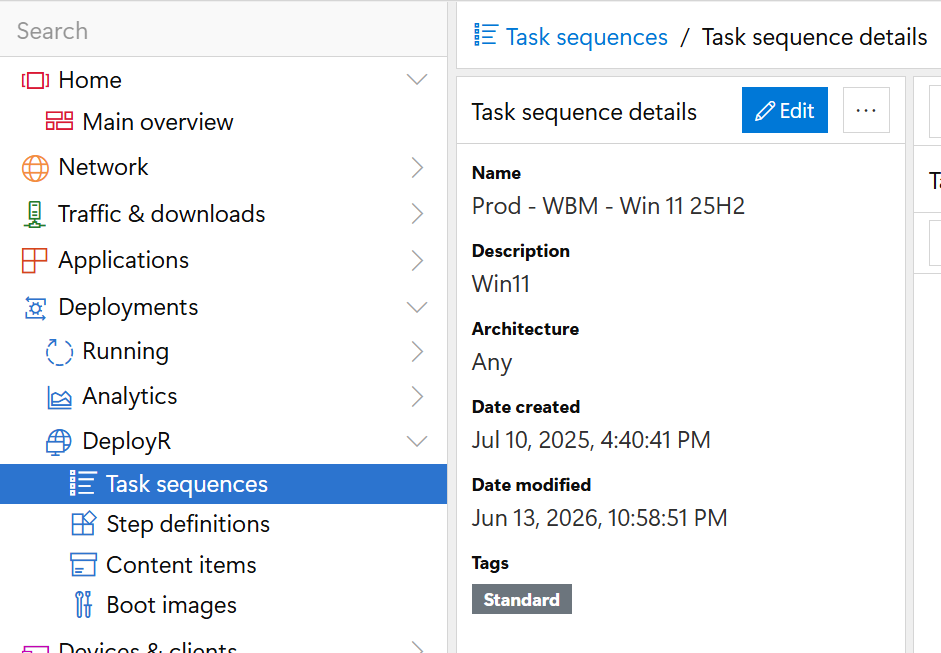
The task sequence metadata is available during the filtering stage, so any of the items are queryable to be filtered on. You can gather that via PowerShell or the console, however PowerShell will provide you with the exact output that the filter will be looking for:
The recommendation would be to leverage tags, which can be easily set, modified and each item can contain several tags. One the metadata is choosen to filter on, the Bootstrap can be updated. This example is for then the task sequence has a tag of "Standard" associated with it.
syntax: "TaskSequenceFilter":"$\_.Tags -contains 'Standard'"
That will be appended to the entire Bootstrap.json like so:
```
{"Variables":{"DeployRHost":"https://214-DeployR.2p.garytown.com:7281","Anonymous":"true","Custom":"true","debug":"true","TaskSequenceFilter":"$_.Tags -contains 'Standard'"}}
```
Then when the boot media is generated, it will filter the task sequences show to just ones that have been tagged with "Standard", even though the server has 23 task sequences on it.
### More Examples
Here are additional examples, just for ideas. Some of the basic task sequence variables will be available to filter on, which will be shown in a few of the examples below.
#### Filtering based on client's network (DEFAULTGATEWAY001)
This example is if you tag a task sequence with specific networks based on their default gateway, then the task sequence will show up for that network. This example will show a server task sequence being available if the subnet is my server network of 192.168.20.1
```
"$_.Tags -contains $tsenv:DEFAULTGATEWAY001"
```
#### Filtering based on client's model
This example we've set the filter to list task sequences based on the model of the workstation
```
"$_.Tags -contains $tsenv:MODEL"
```
### Summary
Based on task sequence item meta data, strings and variables, it gives quite a bit of power over filtering what task sequences will be available for the end user to select.
This requires updating your Bootstrap.json file and regenerating your boot media for each variation of the bootstrap.json file.
### iPXE Web Service Bonus
With iPXE Webservice, additional files can be slipped into the process, making the process dynamic and no need to regenerate the boot media. Several json files can be preconfigured then chosen based on a iPXE menu.\
\
Bootstrap JSON files on web server:
Menu item in iPXEboot.ps1
Custom iPXE Menu (iPXEboot.ps1 file)
With iPXE web service, unique menu items can be added, then different filters applied to each.
---
# Agent Instructions
This documentation is published with GitBook. GitBook is the documentation platform designed so that both humans and AI agents can read, navigate, and reason over technical content effectively. Learn more at gitbook.com.
## Querying This Documentation
If you need additional information that is not directly available in this page, you can query the documentation by asking a question.
Perform an HTTP GET request on the following URL with the `ask` and `goal` query parameters:
```
GET https://documentation.2pintsoftware.com/deployr/1.1/reference/task-sequence-filtering.md?ask=&goal=
```
`ask` is the immediate question: it should be specific, self-contained, and written in natural language.
`goal` is what the user is ultimately trying to achieve, the reason they need the answer. Sharing it helps GitBook give you a better, more relevant answer. A goal is most helpful when it describes the outcome the user wants rather than restating the question. For example, with `ask=how do I create an API token`, a goal like `automate deployments from our CI pipeline` lets GitBook tailor the answer to that use case.
The response will contain a direct answer to the question and relevant excerpts and sources from the documentation.
Use this mechanism when the answer is not explicitly present in the current page, you need clarification or additional context, or you want to retrieve related documentation sections.