> For the complete documentation index, see [llms.txt](https://documentation.2pintsoftware.com/llms.txt). Markdown versions of documentation pages are available by appending `.md` to page URLs; this page is available as [Markdown](https://documentation.2pintsoftware.com/2pxe-server/troubleshooting/dp-package-share-iis-permissions.md).
# DP Package Share IIS Permissions
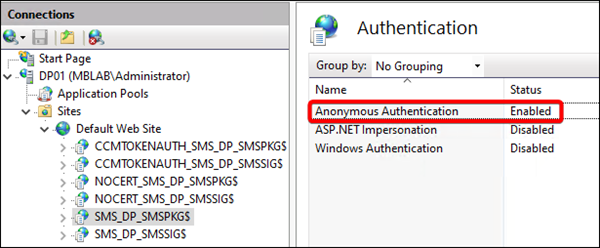
At the time of this writing, an issue has been identified when attempting to use 2PXE Server on a Configuration Manager distribution point. It appears that a recent Configuration Manager update has modified IIS permissions for a CM distribution point package share which disables anonymous access. This causes an issue when a PXE booting client attempts to access a boot image.
This can be resolved by modifying the authentication settings for the CM package share IIS app manually:
Unfortunately, the the setting may be reverted during any future CM update, so it is recommended to create a scheduled task on the 2PXE server to reset the permissions. The following PowerShell command can be ran to set the correct authentication settings:
```
c:\windows\system32\WindowsPowerShell\v1.0\powershell.exe -noprofile -command "&{$webappvalue = (Get-WebConfigurationProperty -Filter /system.webServer/security/authentication/anonymousAuthentication -Location 'Default Web Site/SMS_DP_SMSPKG$' -Name Enabled).Value; if (!$webappvalue) {Set-WebConfigurationProperty -Filter /system.webServer/security/authentication/anonymousAuthentication -Location 'Default Web Site/SMS_DP_SMSPKG$' -Name Enabled -Value 'True'; Add-Content $ENV:Windir\Temp\IIS_Anonymous.log -value ('[{0:yyyy-MM-dd} {0:HH:mm:ss}] {1}' -f (Get-Date), 'Anonymous Authentication is Disabled. Enabling')}}"
```
> Note: The above command will log the result to %WINDIR%\Temp\IIS\_Anonymous.log
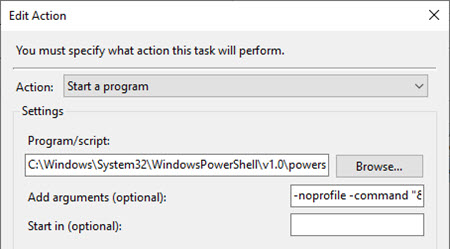
If creating a scheduled task, the task should be configured on a recurring schedule, and using the following Action details:\
Action: **Start a program**\
Settings:\
Program/script: **C:\Windows\System32\WindowsPowerShell\v1.0\powershell.exe**\
Add arguments: **-noprofile -command "&{$webappvalue = (Get-WebConfigurationProperty -Filter /system.webServer/security/authentication/anonymousAuthentication -Location 'Default Web Site/SMS\_DP\_SMSPKG$' -Name Enabled).Value; if (!$webappvalue) {Set-WebConfigurationProperty -Filter /system.webServer/security/authentication/anonymousAuthentication -Location 'Default Web Site/SMS\_DP\_SMSPKG$' -Name Enabled -Value 'True'; Add-Content $ENV:Windir\Temp\IIS\_Anonymous.log -value ('\[{0:yyyy-MM-dd} {0:HH:mm:ss}] {1}' -f (Get-Date), 'Anonymous Authentication is Disabled. Enabling')}}"**
---
# Agent Instructions
This documentation is published with GitBook. GitBook is the documentation platform designed so that both humans and AI agents can read, navigate, and reason over technical content effectively. Learn more at gitbook.com.
## Querying This Documentation
If you need additional information that is not directly available in this page, you can query the documentation dynamically by asking a question.
Perform an HTTP GET request on the current page URL with the `ask` query parameter, and the optional `goal` query parameter:
```
GET https://documentation.2pintsoftware.com/2pxe-server/troubleshooting/dp-package-share-iis-permissions.md?ask=&goal=
```
`ask` is the immediate question: it should be specific, self-contained, and written in natural language.
`goal` is optional and describes the broader end goal you are ultimately trying to accomplish on behalf of the user. GitBook uses it to tailor the answer towards what is most useful for that goal.
The response will contain a direct answer to the question and relevant excerpts and sources from the documentation.
Use this mechanism when the answer is not explicitly present in the current page, you need clarification or additional context, or you want to retrieve related documentation sections.